

It comes in 2 flavors:
Z-Maestro
Z-Maestro is our flagship music composition tool. Imagine being able to compose, record, and mix a piece of music all in the same program. Z-Maestro offers all this and more with a friendly interface and professional features. Whether you are mixing audio for a home movie or composing the next top hit, Z-Maestro has what you need.
New - Appearing now in Z-Maestro 1.5!
Slick Interface
The user interface in Z-Maestro is nearly as beautiful as the music you can make with it. Every inch of the interface has been refined to pixel-perfection in order to provide an unobtrusive and smooth experience. If there is ever any question about what a particular button or knob does, just hover over it to receive an informative tooltip. Other tips also appear throughout the application to point you in the right direction.
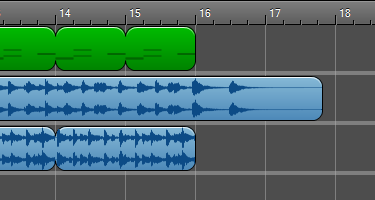
Graphically lay out and mix your projects in the project timeline. Parts can be looped or lengthened with a simple drag that snaps to common note values. Fades and pans are also easy to achieve using the dynamic mixing controls, which provide a visual way of animating values like volume and panning over time.
First-Class Performance
Not only does Z-Maestro look great, but it has been heavily optimized to have the best performance possible, even with the largest projects. One way it does this is by taking advantage of multi-core systems, so it gets even better for dual- and quad-core users.
New Z-Maestro also takes advantage of the raw power of your graphics processor. In spectrogram view, Z-Maestro can leverage an NVidia® graphics card to accelerate the calculation and drawing of the audio spectrogram. While playing your project, Z-Maestro also uses hardware accelerated compositing to ensure a smooth playback experience.
File Format Support
Z-Maestro can import assets in a variety of formats including WAV, MP3, WMA, WMV (audio only), and Ogg Vorbis audio files, as well as straight from audio CD’s. Projects can also be started from existing MIDI files, which preserve track and instrument layout.
When you have finally completed your masterpiece, it is easy to export the entire project to the outside world. Export formats include MP3, WMA, and WAV, ready to be burned onto an audio CD and shared, or into the MIDI format for compact sharing over the web.
Fast Editing
Quickly edit any type of part using Z-Maestro's fast editing environment. Using the roll editor, instrumental and percussion parts can be edited without any knowledge of musical notation. Meanwhile, the audio editor provides an extremely powerful interface for working with any audio clip. Effects can be applied with just a few clicks and are completely reversible. Performing simple edits such as deletions and rearrangements is a breeze.
Adaptive Audio Parts
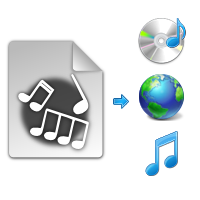
Not only can simple audio clips and sound effects be inserted, but actual instrumental recordings and loops are simple to add as adaptive audio parts. Any audio part may be set to automatically and non-destructively stretch along with the project’s tempo. If you change the project tempo later, the part’s speed will automatically change to match.
Apply Effects
In just a few clicks, you can apply a wide range of special effects. Z-Maestro also comes with several useful mastering effects, like a compressor and high-pass and low-pass filters.
Live Audio Effects
Apply non-destructive real-time audio effects to audio tracks. For example, make an entire track echo in just a couple of clicks. Effects have default settings that sound great for most tracks, but their parameters can also be adjusted manually. Effects include chorus, echo, invert, decimator, and level. Since the effects are non-destructive, they can be added and removed at any time without changing the original audio.
Spectral Editing
In addition to the excellent waveform view in the audio editor, you can also precisely edit an audio clip's frequency spectrum. It's easy to remove high-frequency hisses over an entire clip or even to adjust the volume of an individual sound or note in the audio. The spectrogram's colors are completely customizable and the spectrogram can be exported as an image.
SoundFont Rendering
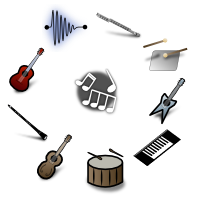
Even the best composition can sound off with the wrong instrument. Z-Maestro gives you the power of the SoundFont 2 format, an industry standard in patch storage. A SoundFont file is usually built using recordings of actual instruments. When it is used to play instrumental and percussion parts in Z-Maestro, you get the sound of the original instrument. You can find literally thousands of free SoundFont files on the internet, many of which sound as good as a real orchestra.
Roll Editor
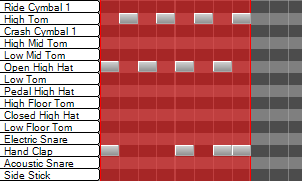
The roll editor in Z-Maestro is a powerful way to create and edit instrumental and percussion parts. Featuring a live preview of notes as you place and edit them, it is perfect for getting chords just right. The piano keys to the left of the editor are also fully functional for finding and testing notes.
External Keyboards
If you have an external USB/MIDI keyboard, you can simply plug it in and play for complete musical freedom. Any MIDI device is supported, and you can use them to record musical parts.
Instrument Selection
Select from the 128 different instruments in an included MIDI General Music standard set. Download new SoundFonts to add, change, or improve the quality of the instruments. In the instrument library, Z-Maestro will preview an arpeggio in order to help you on your journey to finding the perfect sound.
Practice Anytime, Anywhere
Z-Maestro will automatically allow you to practice with your external keyboard without needing to record a part. Just plug it in and start playing. There are also piano and drum practice tools that you can use with the mouse or computer keyboard to quickly and easily try out chords or rhythms.
Multi-Track Recording
New Turn your computer into a recording studio using Z-Maestro's recording abilities. Simultaneously record any number of tracks with just a couple of clicks. Record audio through any available audio input device. If you have a MIDI-compatible device such as a keyboard, you can also use that for recording instrumental parts. Don't have a MIDI keyboard? Not to worry — Z-Maestro will let you use your own computer keyboard as a piano.
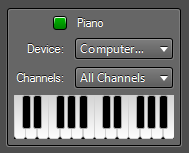
MIDI Support
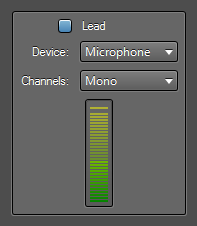
For instrumental and percussion tracks, any MIDI-compatible external instrument can be used. Z-Maestro can route specific MIDI input channels to individual tracks. Don’t have a MIDI keyboard? Not to worry – Z-Maestro will also let you use your own computer keyboard as a piano.
Audio Recording
Record audio from any number of audio input devices at once. While recording, live volume meters respond to the input for real-time monitoring. The newly recorded audio waveform is also generated in real-time.
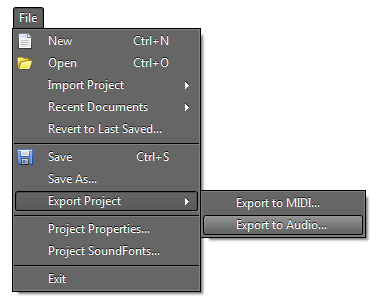
Easy Export
When you have finally completed your masterpiece, it is easy to export the entire project to the outside world. Export formats include MP3, WMA, and WAV, ready to be burned onto an audio CD and shared, or into the MIDI format.
Automation Done Right
Alongside the simple track mixing controls, Z-Maestro also does dynamic mixing (automation). Automation curves appear below the track in order to prevent obscuring the curves. Each curve segment supports five curve types: linear, cosine, logarithmic, exponential, and edge.
Included Loops
Z-Maestro comes bundled with a small library of instrumental and drum parts to help you get started and to provide creative inspiration.
Windows 7 Features
The Z-Maestro experience gets even better on Windows 7, with support for jump lists, taskbar progress, and task dialogs.
High-Quality, Low-Latency
Z-Maestro sports a high-quality, low-latency, state of the art mixing engine. It supports unlimited sample rates when exporting your project, including studio-quality 192 kHz renders and above. It also uses advanced sample interpolation algorithms to eliminate quantization artifacts.
- System Requirements
- Windows XP SP3, Vista SP1, or 7 (recommended)
- DirectX 9 or later graphics card
- .NET Framework 3.5 SP1
- Uses NVidia CUDA for spectrogram rendering, when available
- Requires an NVidia graphics card
- Recording from an external MIDI devices supported
- New Configurable recording channels
- High-quality SoundFont synthesis
- FluidSynth SoundFont engine
- SoundFont 2 support
- Audio Engine
- 16-bit input/output
- Unlimited sample rate
- 22050 Hz default for playback
- 44100 Hz default for export
- High-quality seventh-order interpolation for export
- New Unlimited input/output channels (surround sound support coming in 2.0)
- New Core Audio playback on Windows Vista and 7
- DirectSound playback on Windows XP
Z-Maestro Pro
While we do make a free (Lite) version of Z-Maestro available out of the kindness of our hearts, Z-Maestro is not freeware. The free version has some limitations built-in and it cannot be used for commercial purposes. Purchase Z-Maestro Pro for $29.99 to experience the full extent of Z-Maestro's offerings.
Free Upgrades
By purchasing the current version of Z-Maestro, you also get all future versions as well. Whenever a new version is released, you can update your installed version right from within the application.
General Features |
Lite | Pro |
| Instrument and drum parts |

|
|
| One-shot and adaptive audio parts |
|
|
| SoundFont 2 support |
|
|
| Spectral audio editing |
|
|
| Comprehensive documentation |
|
|
| No expiration |
|
|
| Free updates |
|
|
| Use projects commercially |
|
|
| Use more than 3 tracks |
|
|
| Supports the developers monetarily |
|
|
Export Formats |
||
| WAV |
|
|
| WMA |
|
|
| MP3 |
|
|
| OGG Vorbis New |
|
|
Import Formats |
||
| MIDI |
|
|
| WAV |
|
|
| WMA |
|
|
| MP3 |
|
|
| OGG |
|
|
| Audio CDs |
|
|
Price |
$29.99 |
|
To see a full list of all currently planned major features for each version, see the Z-Maestro Roadmap.